





A Blog Needs More than a Single Page
Many people think a blog is just a page where articles appear. In reality, a good blogging system is a small ecosystem within your website. It needs structure, templates, organisation and a bit of technical care behind the scenes. When all of that is in place, your content becomes easier to manage and far more effective for readers and search engines.
A well‑designed blog gives each type of post the space it needs to shine.
It separates long reads from quick updates and makes your archive easier to explore.
With the right structure, readers can move through your content without friction.
And behind the scenes, you gain a system that’s easier to grow, refine and maintain.
Building the Foundations with the Right Templates
A strong blog starts with the foundations. WordPress is built for blogging, but many themes only include the basics. To create something that works well and looks professional, you need a set of templates that handle different types of content.
That means thinking beyond the default single post layout and giving yourself the flexibility to present articles, guides, reviews, and long‑form content in the way they deserve. Good templates don’t just improve design, they shape the reading experience, reinforce your brand, and make your content easier to navigate. With the right structure in place, every post feels intentional, consistent, and easier to maintain over time.
Why Archive Templates Matter
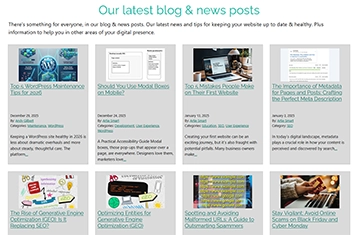
Archive pages are another important part of the system. An archive is simply a page that groups posts together. WordPress uses archive.php as the default layout for categories, tags, authors and dates. For a better experience, it is worth creating dedicated templates for the most important archive types so visitors can browse your content in a structured way.
Dedicated Templates for Categories and Tags
Category and tag templates are often overlooked, yet they play a big role in how people navigate your blog. Category pages group posts into broad topics. Tag pages collect posts with more specific keywords. Both help visitors find what they are looking for and give search engines a clearer understanding of your content. Creating category.php and tag.php templates ensures these pages look consistent and useful rather than feeling like an afterthought.
Designing the Single Post Experience
Single.php handles the layout of each individual blog post. This is where typography, spacing, images and readability really matter. A well designed post template makes your content easier to read and more enjoyable to browse. It also ensures consistency, which becomes more important as your library of articles grows.
Content Still Matters Most
Of course, none of this replaces the need for well written content. A strong technical foundation makes your blog easier to use and more effective, but the words still matter. Clear writing, helpful information and a consistent tone are what keep people coming back. The technical work simply ensures your content has the best possible platform.
Visuals that Help Tell the Story
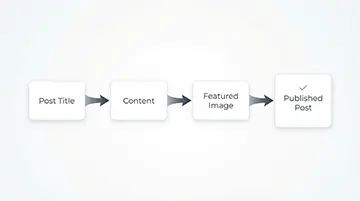
To support the article visually, you could use graphics such as a simple diagram or a flowchart. These help readers understand the structure without needing technical knowledge.
Supporting SEO with a Solid Structure
SEO is another key part of a good blogging system. Clean URLs, readable headings, structured data and well organised archives all help your posts perform better. Adding markup schema for articles gives search engines more context, which can improve visibility. A well built blog also makes it easier to manage meta descriptions, social sharing previews and other small details that add up over time.

Are Author Pages Essential?
Author pages are optional. If you have multiple contributors, an author.php template can be useful because it gives each writer a profile and a place where all their posts are listed. If your site only has one author, this template is less important, but it can still add a nice touch.
Choosing the Right Name for Your Blog
The name you choose for your blog sets the tone for everything that follows. It should be clear, memorable and relevant to the type of content you plan to publish. A good blog name helps readers understand what to expect and supports your overall branding. It can be something straightforward like “Insights” or “Resources”, or something more specific to your industry or audience. The key is choosing a name that feels natural within your website and gives your content a clear home. A well chosen blog name also helps with navigation and SEO, making it easier for visitors and search engines to recognise the purpose of the section.
A Blogging System That Works for the Long Term
A great blogging system is a blend of design, structure, organisation and content. When all of these elements work together, your blog becomes more than a collection of posts. It becomes a valuable part of your website and a tool that supports your business for years to come.
WordPress Blog Template Files Overview
| Title | File Name | Description | Importance |
|---|---|---|---|
| Blog Index | home.php | Controls the main blog feed layout. Used when posts are set as the homepage. | Essential |
| Fallback Template | index.php | Generic fallback template used when no other template matches. | Essential |
| Single Post | single.php | Displays individual blog posts. | Essential |
| Archive Page | archive.php | Handles general archives such as categories, tags, authors and dates. | Recommended |
| Category Archive | category.php | Custom layout for category archive pages. | Recommended |
| Tag Archive | tag.php | Custom layout for tag archive pages. | Recommended |
| Author Archive | author.php | Displays posts written by a specific author. Useful for multi-author blogs. | Optional |
| Date Archive | date.php | Displays posts grouped by date (for example, month or year). | Optional |
| Search Results | search.php | Template for displaying search results. | Recommended |
| No Results / Not Found | 404.php | Shown when no content is found at a requested URL. | Essential |
| Meta Schema | not a single file | Structured data added within templates (for example, posts and archives) to support SEO. | Recommended |
 From the Content & WordPress categories
 How to change your default category from “uncategorized”
Head on over to the lefthand side menu and click on Settings → Writing.
At the top of the screen and find the Default Post Category selection. It will be set to Uncategorized.
Change it to what you want your current default post category to be.